Every subtitle file holds the same three things: some text, when it appears and when it goes away. The formats differ in everything around that. Most people only need one or two, until a platform rejects their file or a conversion quietly drops the styling.
Below are the formats you're likely to meet, who accepts which, and what breaks when you convert. Platform details come from each company's help pages as they read in October 2026.
SRT: the default
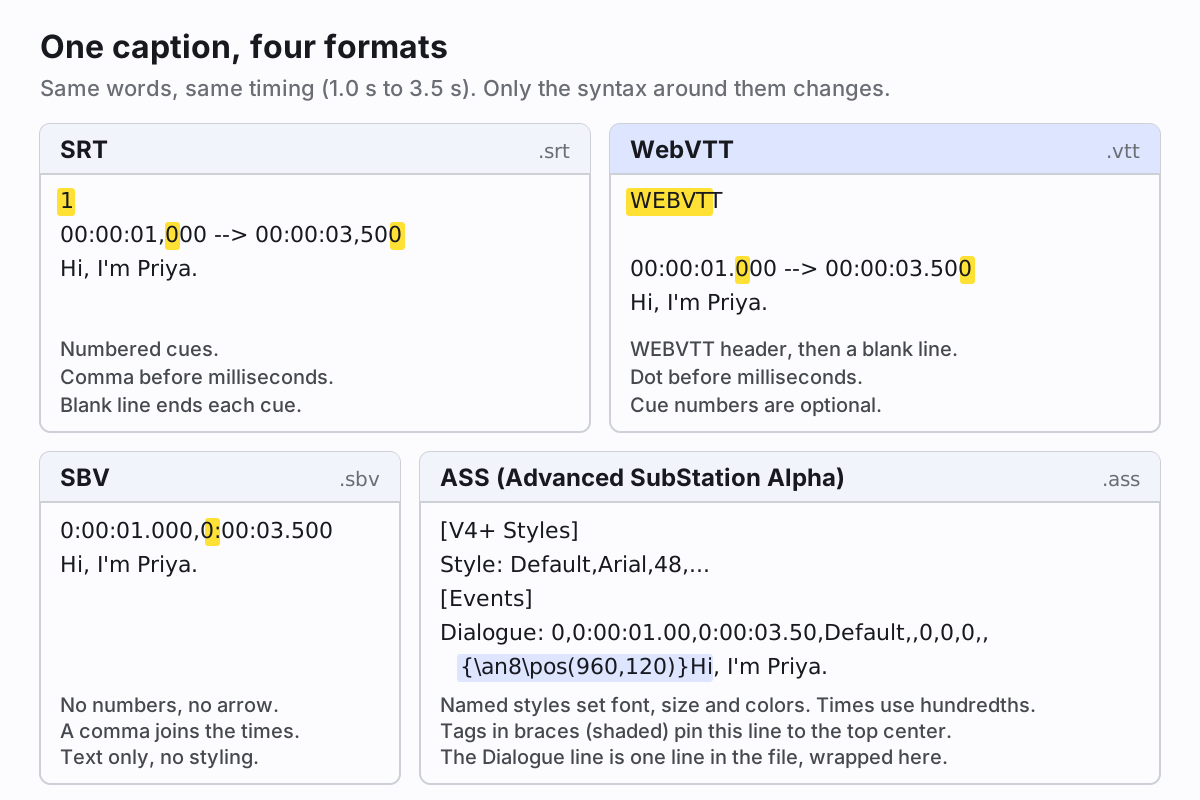
SRT (SubRip Text) is numbered blocks of plain text: a cue number, a timing line like
00:00:01,000 --> 00:00:03,500, the words, and a blank line. It has no official styling beyond a few HTML-style
tags that some players honor, and no positioning at all. That's also why it works nearly everywhere. If you only learn one format,
learn this one. Our complete guide to the SRT file goes through it line by line, with
the mistakes that stop a file from loading.
WebVTT: SRT for the web, plus positioning
WebVTT (.vtt) grew out of SRT and is the format the HTML <video> element reads through its
<track> tag. It starts with a WEBVTT line, uses a dot instead of a comma before the
milliseconds, and makes cue numbers optional. The real addition is cue settings. Put line:10% after the timing and
the cue moves near the top of the frame, which helps when a lower third or on-screen text would otherwise sit under the captions.
Our explainer on what a VTT file is and how WebVTT works covers cue settings and styling.
ASS subtitles: styling that travels with the file
ASS (Advanced SubStation Alpha) and its older sibling SSA come from the fansubbing world, where they're still the norm. An ASS file has a [V4+ Styles] section that defines named styles (font, size, colors, outline, margins) and an
[Events] section with one Dialogue: line per subtitle. Override tags in curly braces change a single
line: {\an8} moves it to the top center, {\pos(960,120)} places it at exact pixel coordinates,
and {\k50} times karaoke syllables in hundredths of a second. The
Aegisub tag reference lists them all.
The catch is support. Desktop players like VLC and mpv render ASS well. Upload platforms and editors mostly don't: ASS isn't on YouTube's list, and it isn't among the formats DaVinci Resolve or Final Cut Pro document for import. If you've styled something in ASS and want people to see it that way, burn it into the video with a player or encoder that renders ASS.
SBV files: YouTube's plain format
An SBV file (SubViewer) is about as simple as subtitles get: a start and end time joined by a comma, like
0:00:01.000,0:00:03.500, the text underneath, and a blank line. No numbers, no arrow, no styling. You'll mostly
meet it around YouTube, whose
supported caption files page says it recognizes no style markup in SRT or SBV, and wants
both saved as plain UTF-8. Outside YouTube, few tools want SBV, so convert it to SRT before taking it anywhere else.
SCC: broadcast captions written in hex
SCC (Scenarist Closed Caption) stores CEA-608 caption data, the closed caption standard of North American TV. You can't read it
like the others. Each line is a timecode such as 00:00:01;00 (the semicolon marks drop-frame timing) followed by
four-digit hex words that tell a decoder what to draw, where and in which color. It supports roll-up and paint-on captions,
placement and a small palette of colors, but it's limited to 32 characters per line.
YouTube calls SCC its preferred format whenever captions are based on CEA-608 features, and Final Cut Pro and Premiere both import and export it. Don't write SCC by hand. Export it from an editor when a spec asks for it.
TTML and DFXP: XML for professional delivery
TTML (Timed Text Markup Language) is the W3C's XML format for timed text. DFXP is its old name, and the TTML2 specification notes the term survives in profile names. It carries regions, styling and positioning, so streaming services and broadcasters base delivery specs on profiles of it such as IMSC1. Apple's iTT is a TTML flavor too. You'll rarely write one by hand: Resolve exports IMSC1 and DFXP, and YouTube and Premiere read TTML.
Subtitle tracks inside MP4 and MKV files
A video container can also hold subtitles as a track the player switches on and off. MP4 carries a 3GPP timed text track, which FFmpeg calls mov_text. MKV is far more flexible: the Matroska spec lists SRT, SSA/ASS, WebVTT and image-based formats like VobSub (from DVDs) and PGS (from Blu-ray). Image-based tracks are pictures of text, so turning them into SRT takes OCR (which is what the original SubRip program did).
With FFmpeg, adding an SRT as a switchable track to an MP4 looks like this:
ffmpeg -i video.mp4 -i talk.srt -map 0 -map 1 -c copy -c:s mov_text -metadata:s:s:0 language=eng out.mp4That's fine for files people play locally. For uploads, use a separate caption file, which is what YouTube, Facebook and Vimeo all document.
Caption file formats compared
| Format | Styling | Positioning | Where it's accepted |
|---|---|---|---|
| SRT (.srt) | A few tags, if the player honors them | None in the standard | Nearly everywhere |
| WebVTT (.vtt) | Bold, italic, underline; CSS on the web | Yes, cue settings | Browsers, YouTube, Vimeo, Resolve |
| ASS/SSA (.ass, .ssa) | Full: fonts, colors, outlines, karaoke | Yes, to the pixel | Desktop players; rarely platforms |
| SBV (.sbv) | None | None | YouTube |
| SCC (.scc) | CEA-608 colors, italics, roll-up | Yes, on a caption grid | Broadcast, YouTube, Final Cut, Premiere |
| TTML/DFXP (.ttml, .dfxp) | Yes | Yes, regions | Streaming delivery, YouTube, Resolve, Premiere |
What YouTube, Facebook, Vimeo and editors accept
- YouTube takes the widest range: SRT, SBV, WebVTT, TTML/DFXP, SCC, SAMI and several broadcast formats, per its supported subtitle and closed caption files page. Only WebVTT, TTML and the broadcast formats keep positioning. Our YouTube subtitle generator makes a file for it.
-
Facebook takes SRT only, and the file name must include a language and country code, like
video.en_US.srt(Facebook's naming rule). Our guide to adding captions to a Facebook video walks through the upload. - Vimeo's help page lists SRT and WebVTT, recommends WebVTT, and asks for UTF-8.
- DaVinci Resolve imports .srt, .srtx, .vtt, .xml and .ttml, and exports SRT, WebVTT, IMSC1 and DFXP, according to the Resolve 21 reference manual. See our DaVinci Resolve subtitles guide.
- Final Cut Pro imports SCC, iTT and SRT, and nothing else. A VTT has to become an SRT first. Details in our guide to captions in Final Cut Pro.
- Premiere's supported caption formats include SRT, SCC, MCC, STL and TTML variants (see our Premiere Pro captions guide).
- iMovie is the odd one out: Apple doesn't document any way to import a subtitle file into it. Our iMovie subtitles guide covers the workarounds.
- VLC plays SRT, SubViewer, SSA/ASS, SAMI and more. Our guide to VLC subtitles covers loading and delaying them.
Converting between formats, and what gets lost
Going from a simple format to another simple format is safe. SRT to WebVTT is mechanical: add the header, swap commas for dots.
FFmpeg does it with ffmpeg -i talk.srt talk.vtt, and the free Subtitle Edit converts between dozens of formats.
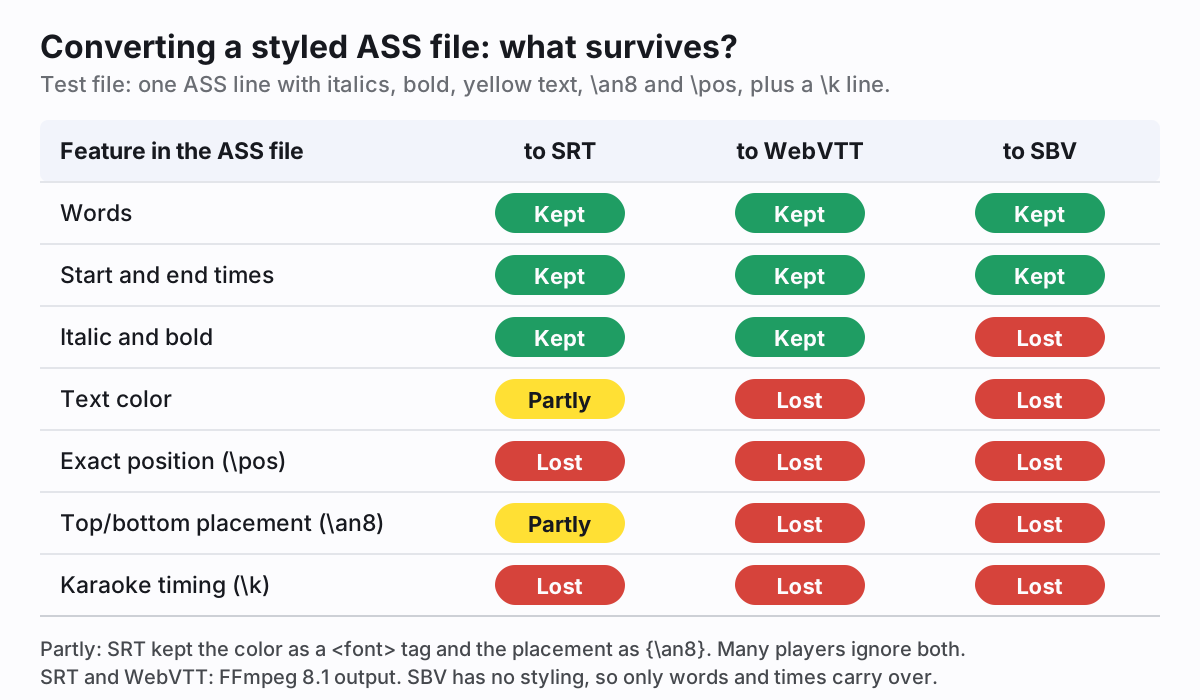
Going from a rich format to a simple one loses things. We wrote an ASS test file with italics, bold, yellow text, a top placement, an exact position and a karaoke line, then converted it with FFmpeg 8.1:
A few other things to watch for:
- Timing precision. ASS stores hundredths of a second and SCC counts frames, so converting into them rounds your times.
- Line limits. CEA-608 allows 32 characters per line, so long SRT lines get rewrapped or rejected on the way to SCC.
- Half-supported tags. SRT made from ASS can carry
<font color>and{\an8}. Some players obey them, some ignore them, some print them as text. - Encoding. Save as UTF-8. YouTube and Vimeo both ask for it, and it fixes accented letters turning into junk.
- TTML output. FFmpeg's TTML writer dropped the italics from our test SRT, so check the output in a player before you deliver it.
Our rule: keep the richest version as the master and export simpler formats from it. Styling doesn't come back from a round trip.
Getting a file in the format you need
If you have a video and no subtitles yet, our SRT generator transcribes it and gives you a timed file to correct. It exports SRT, VTT and plain text, which covers YouTube, Facebook, Vimeo, Resolve, Final Cut and the web. For ASS, SBV, SCC or TTML, convert the SRT with the tools above. If you'd rather have the text drawn into the picture, the auto captions editor burns it into the video in the style you pick.