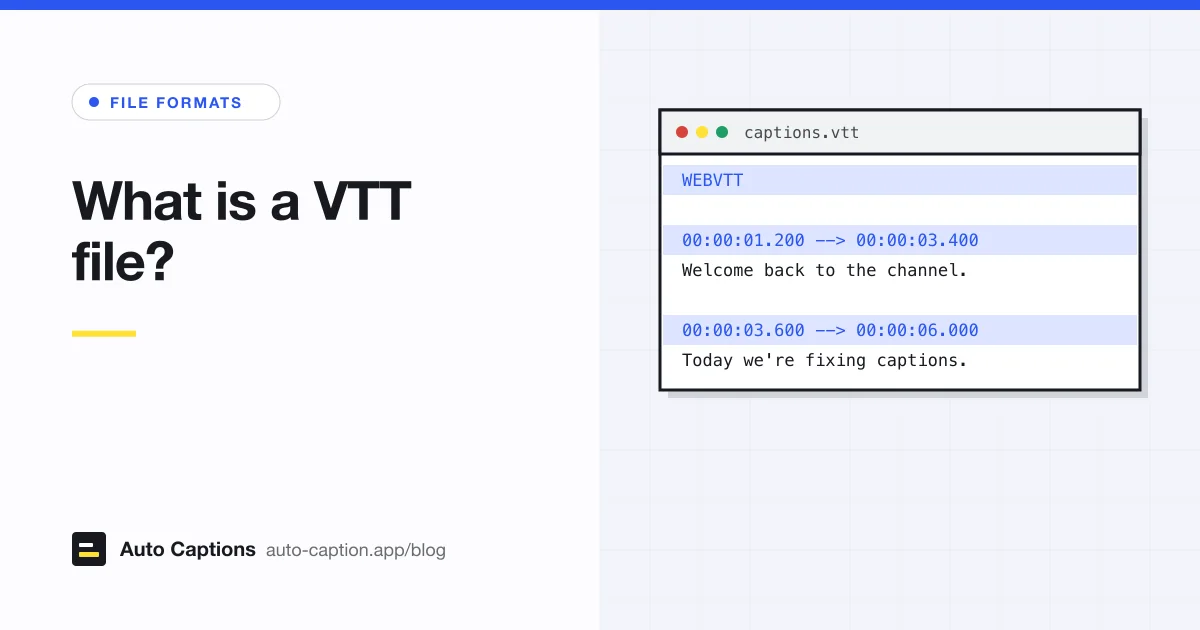
You usually meet a .vtt in one of two places: next to a video on a website, or in a download from a meeting or video platform. Zoom's cloud recordings, for instance, give you the audio transcript as a VTT, which our guide to Zoom captions and transcripts covers. Either way, it's a text file you can open and read. The rules below follow the W3C WebVTT specification (a Candidate Recommendation Draft dated 20 May 2026) and MDN's WebVTT reference, both checked in October 2026.
The WebVTT format, piece by piece
Here's a small but complete file that uses most of the features you'll see in the wild:
WEBVTT

NOTE Checked against the final cut

STYLE
::cue(v[voice="Priya"]) {
  color: #ffe034;
}

intro
00:00:01.000 --> 00:00:04.200
<v Priya>Hi, I'm Priya, and today
I'm editing a video.</v>

00:04.600 --> 00:07.050 line:10%
[upbeat music]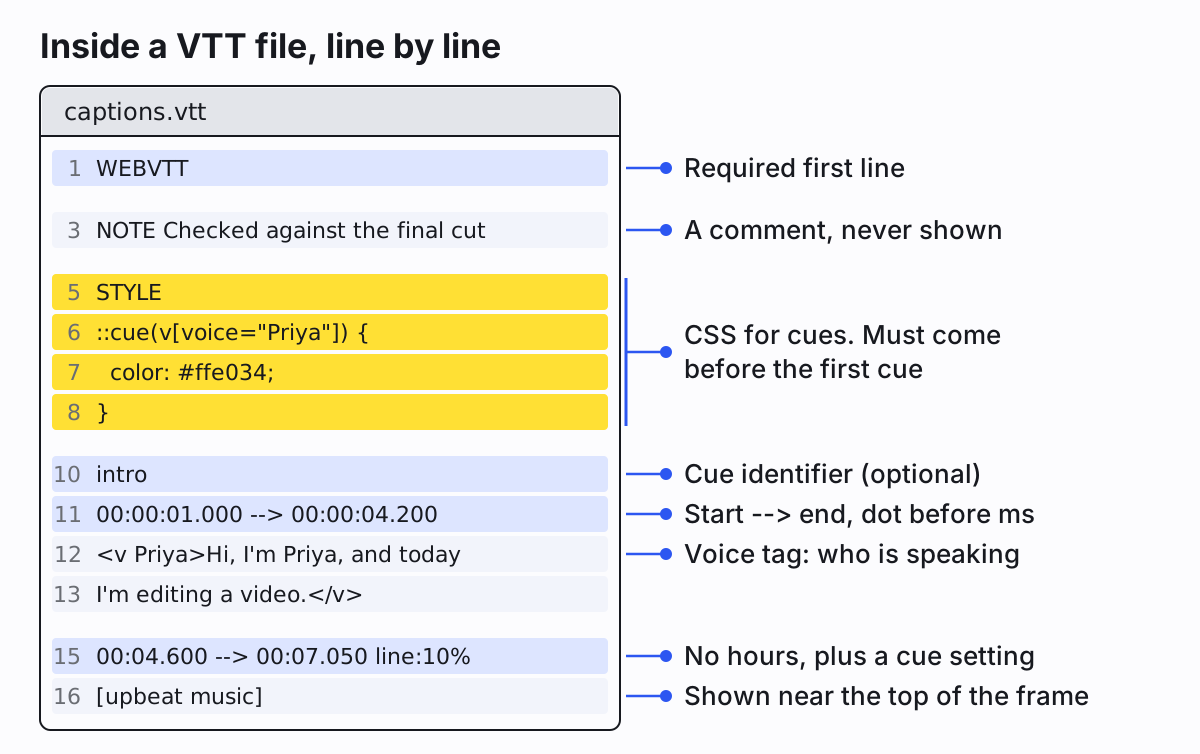
The header
The file must start with WEBVTT. A byte order mark before it is allowed, and so is text after it on the same line if a
space or tab separates them (WEBVTT English captions is fine). A blank line follows. If the first line is anything else,
for example a cue number copied over from an SRT, browsers reject the whole file. It must also be saved as UTF-8. The spec allows no
other encoding.
Cues and timestamps
Each cue is a block separated from the next by a blank line. It can start with an identifier, a name for the cue like
intro or a plain number. Identifiers are optional, must be unique, and are useful for scripts and for styling one cue.
Then comes the timing line: start, space, -->, space, end.
Timestamps use a dot before the milliseconds: 00:00:04.200, never a comma. The hours can be left off when they're zero,
so 00:04.600 is valid, and the hours can run past 99 for very long recordings. The end must come after the start, and
each cue must start no earlier than the one before it.
The text below the timing line is the cue payload, on one or more lines. A few tags work inside it: <i>,
<b> and <u> for italic, bold and underline, <c.name> for a CSS class,
<v Priya> to mark who's speaking, and <lang es> for a phrase in another language. Because
< starts a tag, write a literal less-than sign as < and an ampersand as &.
NOTE and STYLE blocks
A block starting with NOTE is a comment. Players never show it. It's handy for "translated by" or "checked against the
final cut" notes, and it can't contain -->, since that would look like a timing line.
A STYLE block holds CSS for the cues, using the ::cue selector. In the sample,
::cue(v[voice="Priya"]) turns everything Priya says yellow. Style blocks must come after the header and before the first
cue. Browser support for styling from inside the file varies, so test in the browsers you care about before relying on it.
Cue settings: moving captions around the frame
This is the part SRT has no answer to. After the end time on the timing line you can add settings that tell the player where to put the cue:
linesets the vertical position: a line number (line:0is the top line,line:-1the bottom one) or a percentage of the video height.positionsets the horizontal position as a percentage of the width.sizesets the width of the cue box as a percentage.alignaligns the text within that box:start,center,end,leftorright.vertical(rlorlr) turns the text vertical, for languages like Japanese.regionplaces the cue in a named region defined at the top of the file, used for scrolling roll-up captions.
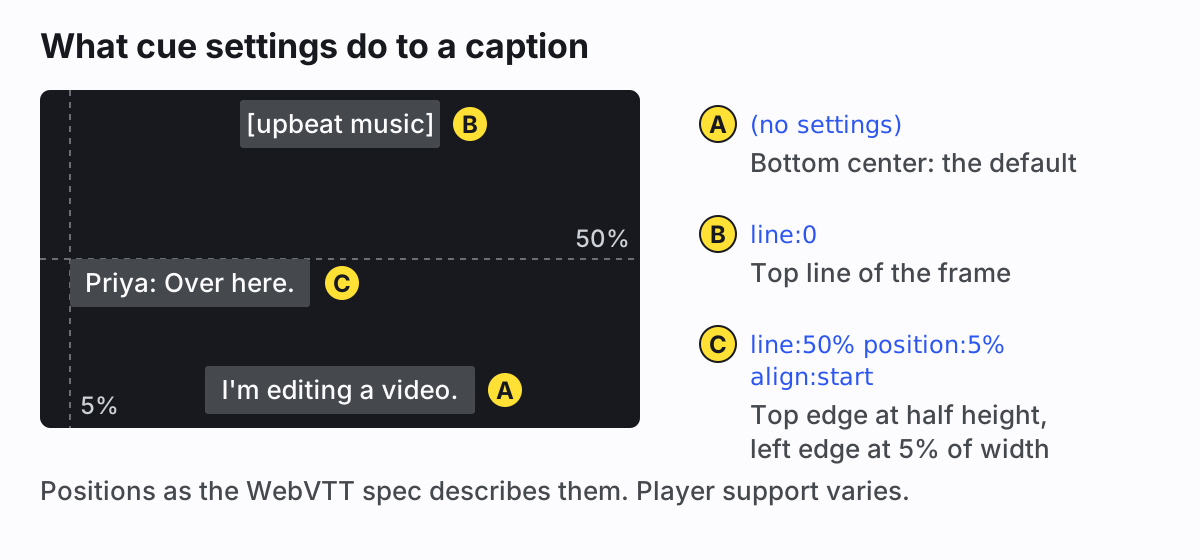
This is most useful when a name title or on-screen graphic sits at the bottom of the frame: line:0 or
line:10% moves the captions above it for those few seconds. Keep settings to the cues that need them. A player that ignores
them shows the cue in its default spot at the bottom, so nothing breaks.
How the HTML track element uses a VTT file
On a web page, captions reach the <video> element through a <track> element, and WebVTT is the
format it takes. A typical setup with two languages:
<video controls src="talk.mp4">
  <track kind="captions" src="talk.en.vtt"
         srclang="en" label="English" default>
  <track kind="subtitles" src="talk.es.vtt"
         srclang="es" label="Español">
</video>
From MDN's track reference: kind is subtitles (the default),
captions, descriptions, chapters or metadata. srclang is required
for subtitles. label is the name viewers see in the player's caption menu. Only one track should carry
default. If the .vtt lives on another domain, the video needs a crossorigin attribute and the server has
to allow the request, otherwise the track silently fails to load. Serve the file with the MIME type text/vtt.
Viewers switch these on and off with the player's CC button, so they're closed captions. If the text has to be visible on every player, burn it into the picture instead with our burn-in tool, which reads VTT as well as SRT.
How to open a VTT file
To read or fix text, any plain text editor works: Notepad on Windows, or TextEdit on a Mac after choosing Format, then Make Plain Text. Save as UTF-8 and keep the .vtt extension. To watch it with its video, load both into a player: VLC reads WebVTT, and our guide to adding subtitles in VLC shows how. To edit timing, a subtitle editor like Subtitle Edit is far nicer than a text editor, because it shows the video and a waveform next to the lines. And to test how it looks on the web, drop it into a page with the track element above.
How to make a VTT file for your own video
Typing one by hand is fine for a 20-second clip. For anything longer, generate a draft and correct it. Our
SRT generator also exports VTT: drop in a video up to 30 minutes, it transcribes the
audio with word-level timing, you fix names and numbers, then download. What you get is a clean, plain file: the
WEBVTT header, then cues with full HH:MM:SS.mmm timestamps, no identifiers and no cue settings. Add
settings by hand afterwards for the few cues that need moving.
If you import an existing VTT into our editor to restyle it, know what survives. Text and timing come through. NOTE and STYLE blocks,
cue settings and tags like <v> are dropped, and a two-line cue becomes one line that the preview wraps again. Keep
your original if those details matter.
VTT vs SRT in short
WebVTT grew out of SRT, so a cue looks almost the same. The differences: VTT needs the WEBVTT header, uses a dot instead
of a comma before the milliseconds, makes cue numbers optional, must be UTF-8, and adds cue settings and CSS styling. Use VTT for
video on your own website. Use SRT when uploading to platforms and editors, since more of them accept it. YouTube takes both, per its
supported file list. Our
SRT file guide has a side-by-side table, and the wider comparison of SRT, VTT, ASS, SBV and
the rest is in our roundup of subtitle file types.